This document is a how-to guide for online gambling Operators wanting to offer Playtech games and Playtech bonuses to their players. Playtech is providing an out-of-the-box solution called GamesLink against which small to mid-size Operators can easily integrate and be part of Playtech’s offering.
# Quick Start
The Gameslink Integration Guide includes instructions on the development order, gameplay scenarios, regulatory requirements, bonus usage and game launch capabilities. This guide should be used along side the API Specification and Integration Testing Tool. It’s recommended to go over the development order and then proceed to using the testing tool for specific examples.
#Game Launcher
To launch Playtech games from their portal, Operators can use GamesLink Game Launcher. This a dedicated HTTP endpoint that redirects the player to the game if correct parameters are passed.
A very high-level game launch flow looks like this:
Player logs into the Operator’s portal;
Player clicks on a Playtech game banner;
Operator generates new or uses existing (temporary) external token meant for Playtech game(s);
Game Launcher URL is opened with the external token, player parameters, and game ID;
Game Launcher validates the external token and launches the game.
# Game History
Game History is included in Playtech’s gaming clients by default. For the quickest and most convenient solution, the built-in gaming history can be used. However, it is also possible for Operators to build their own history with the information they receive via the API.
Building the Game History view on the Operator’s side (optional)
When the player completes a game round, a GameRoundResult request is sent to the Operator’s Wallet. In addition to other information, a never-expiring URL to detailed game history is also provided to the Operator. The URL is without the domain part, just the path is provided. The URL domain of the game history details is provided during the integration process. It is not relevant for the Operator to interpret the URL content in any way, it should just be stored for later use.
The game history detailed URL is not sent at the end of side game rounds and when a player’s bet is refunded.
Building the Game History view on the Operator’s side enables the Operator to also offer Players a unified game history experience across games of different providers. A detailed game history URL can be incorporated into the listing so that the player can open it whenever they wish to.
There is no special authentication mechanism included in the detailed game history URL access, but the parameters are constructed in a way that makes it impossible to guess someone’s game round details.
It is recommended that the detailed game history URL is opened in a scalable way (scrollable) for the player. There are great variations in the size of the page itself, depending on the game round outcome and the game itself.
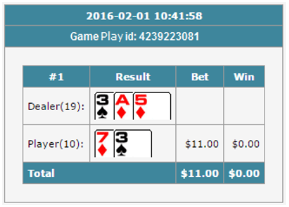
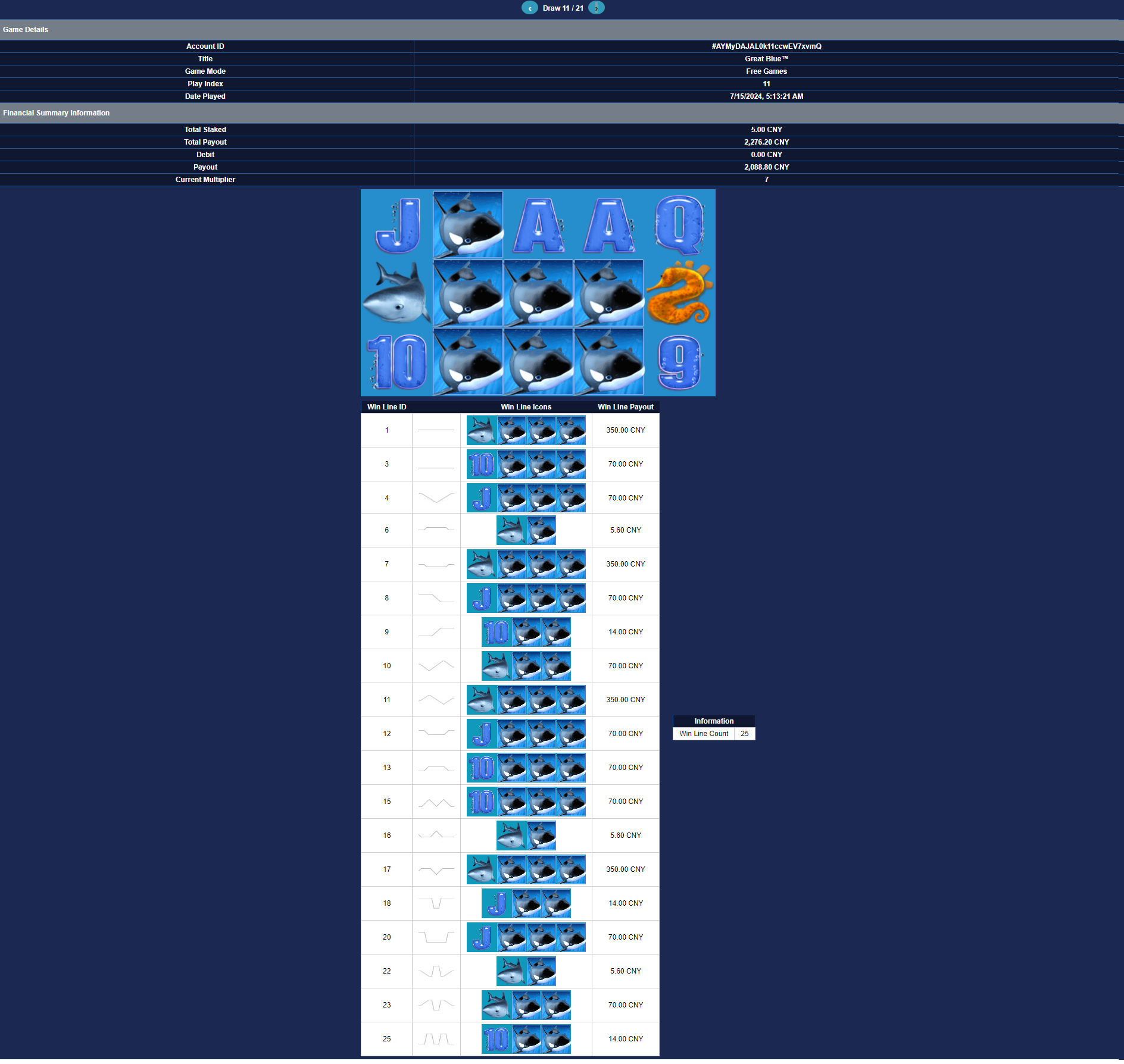
Example screenshot of a detailed game history:
#From Operator API
All "From Operator" API calls need to provide x-auth-kiosk-key header. Kindly obtain the kiosk key from technical support. This key allows the platform to identify that the request is coming from which operator.
POST/from-operator/endLoginSession
This endpoint is used by operator to end a player's game session.
 ### Error in case invalid player ###
{
	"code": 200,
    "message": "",
    "data": {
        "requestId":"e9ccd456-4c6a-47b3-922f-66a5e5e13513",
        "error":{
            "description": "Unable to read player from database: player1",
            "code":"ERR_PLAYER_NOT_FOUND"
        }
    },
    "timestamp": "2024-06-04T12:42:57+00:00"
}
endLoginSession Request:
Parameter
Location
Type
Default
Description
x-auth-kiosk-key
header
string
required
{{kiosk_key}}
requestId
body
string
required
Unique identifier of the request to help troubleshooting of problems between the systems. Must be echoed back in the request response.
minSize: 11
maxSize: 255
serverName
body
string
required
The name of the game server. (Case Sensitive)
username
body
string
required
The username of the player. Must be unique. Must contain kiosk prefix. {{kiosk_prefix}}_{{string}}
minSize: 1
maxSize: 32
externalToken
body
string
The external token to indicate a game session for a player. Must contain kiosk prefix. {{kiosk_prefix}}_{{string}}
(If provided, will end the specific session for the player associated with the external token. If not provided, will end all sessions for the player.)
endLoginSession Response:
Parameter
Type
Default
Description
code
integer
required
The status code of the response.
message
string
Error descriptor. Only present when service failed to process request
The timestamp of the response Format: "yyyy-mm-dd hh24:mi:ss", GMT time zone. (Example: 2024-06-14T20:11:19+00:00)
POST/from-operator/getGameLaunchUrl
This endpoint allows you to retrieve the game launch URL. After obtaining the game launch URL, operator can redirect player to the provided URL to start game.
Note: The game code is presented in a unique format for direct table. For a clear reference, please see Example 2 in the request section, which uses a direct table layout.
Example 1: Normal Open game
Cache-Control: no-cache, no-store
Connection: Keep-Alive
Content-Type: application/json; charset=UTF-8
Date: Fri, 13 Apr 2018 10:36:15 GMT
{
  "code": 200,
  "message": "",
  "data": {
    "url": "https://gamelaunch.com/?gameCodeName=bib&username=MCCT_PLAYER001&externalToken=MCCT_TOKEN123456789&casino=PLAYTECHSERVER&clientPlatform=web&language=en&playMode=1&lobbyUrl=https%3A%2F%2Fwww.lobby.com"
  },
  "timestamp": "2024-05-01T03:09:18+00:00"
}
 ### Error in case incorrect token ###
{
    "code":422,
	"message":"The client platform field is required.",
	"data":null,"timestamp":"2025-06-04T03:42:06+00:00"
}
GameLaunchRequest:
Parameter
Location
Type
Default
Description
x-auth-kiosk-key
header
string
required
{{kiosk_key}}
requestId
body
string
required
Unique identifier of the request to help troubleshooting of problems between the systems. Must be echoed back in the request response.
minSize: 11
maxSize: 255
serverName
body
string
required
The name of the game server. (Case Sensitive)
username
body
string
required
The username of the player. Must be unique. Must contain kiosk prefix. {{kiosk_prefix}}_{{string}}.
Player username provided by the operator must be in uppercase.
minSize: 1
maxSize: 32
gameCodeName
body
string
required
Identifies the Playtech game to be launched.
clientPlatform
body
string
required
Client platform where the game is being launched.
Options:
web
mobile
externalToken
body
string
required
The external token to indicate a game session for a player. Must contain kiosk prefix. {{kiosk_prefix}}_{{string}}
minSize: 11
maxSize: 255
language
body
string
required
Language of the game client being launched. (ISO 639-1)
playMode
body
number
The mode of play (0 for fun, 1 for real).
lobbyUrl
body
string
URL to the lobby page. Used by Game Launcher to redirect to lobby when clicking on the Lobby button or in case of problems.
configurationKey
body
string
To disable lobby in live games
value: nolobby
GameLaunchResponse:
Parameter
Type
Default
Description
code
integer
required
The status code of the response.
message
string
Error descriptor. Only present when service failed to process request
The timestamp of the response Format: "yyyy-mm-dd hh24:mi:ss", GMT time zone. (Example: 2024-06-14T20:11:19+00:00)
POST/from-operator/getPlayerBonusHistory
Returns a list of player's non-active bonuses that have been issued in the last year. Maximum number of bonuses returned is 500, ordered by removal date (descending).
### Example 1 - Player not found ###
{
    "code": 200,
    "message": "",
    "data": {
        "requestId": "123",
        "error": {
            "description": "Unable to read player from database: CRXTESTDEV2_Player13122-ptstaging3.210",
            "code": "ERR_PLAYER_NOT_FOUND"
        }
    },
    "timestamp": "2025-07-04T07:11:28+00:00"
}

### Example 2 - Too long username ###
{
	"requestId": "100001232",
	"error": {
		"description": "Invalid string length: objectIdentity.username=111111111111111111111111111111111111111111111. Max is 32.",
		"code": "CONSTRAINT_VIOLATION"
	}
}
GetPlayerBonusHistoryRequest:
Parameter
Location
Type
Default
Description
x-auth-kiosk-key
header
string
required
{{kiosk_key}}
requestId
body
string
required
Unique identifier of the request to help troubleshooting of problems between the systems. Must be echoed back in the request response.
minSize: 11
maxSize: 255
serverName
body
string
required
The name of the game server. (Case Sensitive)
username
body
string
required
The username of the player. Must be unique. Must contain kiosk prefix. {{kiosk_prefix}}_{{string}}
minSize: 1
maxSize: 32
removalType
body
string
required
Filters bonus instances based on matching removal reason. If not provided, all types are returned.
Enum:
REDEEMED : Bonus instance was removed by redemption.
CANCELLED : Bonus instance was removed by cancellation.
DECLINED : Bonus instance was declined (cancelled while still in waiting status).
GetPlayerBonusHistoryResponse:
Parameter
Type
Default
Description
code
integer
required
The status code of the response.
message
string
Error descriptor. Only present when service failed to process request
The timestamp of the response Format: "yyyy-mm-dd hh24:mi:ss", GMT time zone. (Example: 2024-06-14T20:11:19+00:00)
POST/from-operator/getPlayerActiveBonuses
Returns a list of player's active bonuses. It includes the bonus name, the remaining amount or count depending on the bonus type, the remaining wagering requirements and bonus balance.
### Example 1 - Player not found ###
{
	"message": "Unable to read player from database: arvik-ptstaging3.33",
    "errors": {
		"code": "ERR_PLAYER_NOT_FOUND"
	}
}

### Example 2 - Too long username ###
{
	"message": "Invalid string length: objectIdentity.username=111111111111111111111111111111111111111111111. Max is 32.",
    "errors": {
		"code": "CONSTRAINT_VIOLATION"
	}
}
GetPlayerActiveBonusesRequest:
Parameter
Location
Type
Default
Description
x-auth-kiosk-key
header
string
required
{{kiosk_key}}
requestId
body
string
required
Unique identifier of the request to help troubleshooting of problems between the systems. Must be echoed back in the request response.
minSize: 11
maxSize: 255
serverName
body
string
required
The name of the game server. (Case Sensitive)
username
body
string
required
The username of the player. Must be unique. Must contain kiosk prefix. {{kiosk_prefix}}_{{string}}
minSize: 1
maxSize: 32
GetPlayerActiveBonusesResponse:
Parameter
Type
Default
Description
code
integer
required
The status code of the response.
message
string
Error descriptor. Only present when service failed to process request
The timestamp of the response Format: "yyyy-mm-dd hh24:mi:ss", GMT time zone. (Example: 2024-06-14T20:11:19+00:00)
POST/from-operator/getSupportedFreeSpinBetValues
Used for retrieving the list of supported Free Spin bet values for a game or set of games. If multiple games are provided, then a list of common bet values across specified games is returned. Returned bet values are used to issue a Free Spin bonus to the player - at least one or more values must be provided.
### Example 1 - Requesting supported free spin bet values for certain games only ###
POST /from-operator/getsupportedfreespinbetvalues HTTP/1.1
Content-Type: application/json; charset=UTF-8
Host:playtech.api
Connection: Keep-Alive
x-auth-kiosk-key: kiosk_key
User-Agent: Apache-HttpClient/4.5 (Java/1.8.0_152)
Accept-Encoding: gzip,deflate
{
	"requestId": "2621194953084395995",
	"serverName":"PLAYTECHSERVER",
	"currencyCode": "EUR",
	"gameCodeNames": ["gpas_tttotems_pop", "whk", "gpas_engage_pop"]
}
The timestamp of the response Format: "yyyy-mm-dd hh24:mi:ss", GMT time zone. (Example: 2024-06-14T20:11:19+00:00)
POST/from-operator/giveFreeSpins
Used for giving players free spins based on a bonus template configured on the Playtech side. It is possible to define the free spin count and the list of games in which it is usable together with the win wagering multiplier (if the correct bonus template is used). This request also creates a player record on the Playtech side on-demand, meaning that the Operator must pass a couple of player related parameters. If the Operator is sure of having created the player record already on the Playtech side (e.g. has successfully issued player a bonus at least one time), it can leave the player-specific fields empty.
### Example 1 - Giving a FREESPIN1 bonus with value for certain games only ###
POST /from-operator/giveFreeSpins HTTP/1.1
Content-Type: application/json; charset=UTF-8
Host:playtech.api
Connection: Keep-Alive
x-auth-kiosk-key: kiosk_key
User-Agent: Apache-HttpClient/4.5 (Java/1.8.0_152)
Accept-Encoding: gzip,deflate
{
    "requestId":"Mid4giMuud",
	"serverName":"PLAYTECHSERVER",
    "username":"SomePlayer",
    "templateCode":"67183",
    "count":2,
    "remoteBonusCode":"2MPNP309ZH",
    "remoteBonusDate":"2021-03-13 12:34:56.789",
    "playerData":{
    	"currencyCode":"EUR",
    	"countryCode":"EE"
    }
}

### Example 2 - Giving a FREESPIN2 bonus with value for certain games only ###
POST /from-operator/giveFreeSpins HTTP/1.1
Content-Type: application/json; charset=UTF-8
Host: operator.com | playtech.api
Connection: Keep-Alive
x-auth-kiosk-key: kiosk_key
User-Agent: Apache-HttpClient/4.5 (Java/1.8.0_152)
Accept-Encoding: gzip,deflate
{
    "requestId": "123",
    "serverName": "AGCASTG",
    "username": "K1_MOCKPLAYER2",
    "templateCode": "63823",
    "playerData":{"currencyCode":"MYR","countryCode":"MY"},
    "amount": 20,
    "betValues": [0.40, 0.80],
    "remoteBonusCode": "000000",
    "remoteBonusDate": "2025-02-26 08:40:00.000"
}
### Example 1 - Constraint violation ###
{
	"requestId":"19860313-4rv1-1337-h4xr-123419860313",
	"error":{
		"description":"Invalid string length: objectIdentity.username=guid_79edb7bc-073c-4625-b8b7-051742566cd9. Max is 32.",
		"code":"CONSTRAINT_VIOLATION"
	}
}

### Example 2 - Invalid template code format, only INT is supported ###
{
	"requestId":"100001193",
	"error":{
		"description":"Invalid number : asdf",
		"code":"INTERNAL_ERROR"
	}
}

### Example 3 - Incorrect template code ###
{
	"requestId": "100001222",
	"error": {
		"description": "Giving bonus failed: Template does not exist or currency is not supported by selected template casino",
		"code": "ERR_BONUS_TEMPLATE_NOT_FOUND"
	}
}

### Example 4 - Invalid free spin bet value ###
{
	"requestId":"8172227904659636303",
	"error":{
		"description":"One or more of selected bet values is not allowed for selected games: allowedBetValues=[0.25, 0.50, 0.75, 1.00, 1.25, 1.50, 2.00, 2.50, 5.00, 6.25, 7.50, 10.00, 12.50, 18.75, 25.00, 50.00, 125.00, 250.00], selectedBetValues=[3USD]",
		"code":"ERR_INVALID_FREESPIN_BET_VALUE"
	}
}

### Example 5 - Count and Amount cant be used together in the same request ###
{
	"requestId": "eiAIESpYzA",
	"error": {
		"description": "Assigning Free Spin count to a bonus with specific amount is not supported.",
		"code": "CONSTRAINT_VIOLATION"
	}
}
GiveFreeSpinsRequest:
Parameter
Location
Type
Default
Description
x-auth-kiosk-key
header
string
required
{{kiosk_key}}
requestId
body
string
required
Unique identifier of the request to help troubleshooting of problems between the systems. Must be echoed back in the request response.
minSize: 11
maxSize: 255
serverName
body
string
required
The name of the game server. (Case Sensitive)
username
body
string
required
The username of the player. Must be unique. Must contain kiosk prefix. {{kiosk_prefix}}_{{string}}
minSize: 1
maxSize: 32
templateCode
body
string
required
Playtech side bonus template code that is being used for giving bonus.
minSize: 1
maxSize: 32
remoteBonusCode
body
string
required
Identifies the bonus instance on Operator side. Max length: 128 chars.
minSize: 1
maxSize: 128
remoteBonusDate
body
string
required
Bonus instance issue time on Operator side. Format: "yyyy-mm-dd hh24:mi:ss.SSS", GMT timezone.
gameCodeNames
body
array of string
Optional list of games in which the bonus is usable. Overrides game list configured to bonus template gaming context.
If provided, only the games listed in gameCodeNames are eligible to use the bonus.
If not provided, all games included in the templateCode configuration are eligible by default.
The timestamp of the response Format: "yyyy-mm-dd hh24:mi:ss", GMT time zone. (Example: 2024-06-14T20:11:19+00:00)
POST/from-operator/giveGoldenChips
Used for giving player golden chips based on a bonus template configured on Playtech side. It is possible to define the golden chips count, chip value and list of games in which it is usable. This request also creates a player record on the Playtech side on-demand, meaning that the Operator must pass a couple of player related parameters. If the Operator is sure of having created the player record already on the Playtech side (e.g. has successfully issued player a bonus at least one time), it can leave the player-specific fields empty.
### Example 1 - Constraint violation ###
{
	"requestId":"19860313-4rv1-1337-h4xr-123419860313",
	"error":{
		"description":"Invalid string length: objectIdentity.username=guid_79edb7bc-073c-4625-b8b7-051742566cd9. Max is 32.",
		"code":"CONSTRAINT_VIOLATION"
	}
}

### Example 2 - Invalid template code format, only INT is supported ###
{
	"requestId":"100001193",
	"error":{
		"description":"Invalid number : asdf",
		"code":"INTERNAL_ERROR"
	}
}

### Example 3 - Incorrect template code ###
{
	"requestId": "100001222",
	"error": {
		"description": "Giving bonus failed: Template does not exist or currency is not supported by selected template casino",
		"code": "ERR_BONUS_TEMPLATE_NOT_FOUND"
	}
}

### Example 4 - Incorrect player data ###
{
	"requestId":"100001223",
	"error":{
		"description":"Failed to process playerData.",
		"code":"INTERNAL_ERROR"
	}
}
GiveGoldenChipsRequest:
Parameter
Location
Type
Default
Description
x-auth-kiosk-key
header
string
required
{{kiosk_key}}
requestId
body
string
required
Unique identifier of the request to help troubleshooting of problems between the systems. Must be echoed back in the request response.
minSize: 11
maxSize: 255
serverName
body
string
required
The name of the game server. (Case Sensitive)
username
body
string
required
The username of the player. Must be unique. Must contain kiosk prefix. {{kiosk_prefix}}_{{string}}
minSize: 1
maxSize: 32
templateCode
body
string
required
Playtech side bonus template code that is being used for giving bonus.
count
body
long
required
Number of golden chips to issue to the player.
value
body
decimal
required
Value of a single golden chip. Possible values: 0.01, 0.05, 0.1, 0.2, 0.25, 0.5, 1, 2, 5, 10, 20, 50, 100, 150, 200, 300, 500, 1000, 1250, 1500, 3000, 5000, 10000, 15000, 30000, 50000, 100000, 150000, 500000, 750000
decimalPrecision: 22
decimalScale: 2
remoteBonusCode
body
string
required
Identifies the bonus instance on Operator side. Max length: 128 chars.
minSize: 1
maxSize: 128
remoteBonusDate
body
string
required
Bonus instance issue time on Operator side. Format: "yyyy-mm-dd hh24:mi:ss.SSS", GMT timezone.
Limited amount of player data needed to create player record on Playtech side. Should be sent with each request to avoid situations where bonus needs to be issued but player doesn't exist on Playtech side.
gameCodeNames
body
array of string
Optional list of games in which the bonus is usable. Overrides game list configured to bonus template gaming context.
expirationDate
body
string
The date and time of the bonus expiration. Format: "yyyy-mm-dd hh24:mi:ss.SSS", GMT time zone.
GiveGoldenChipsResponse:
Parameter
Type
Default
Description
code
integer
required
The status code of the response.
message
string
Error descriptor. Only present when service failed to process request
### Error when trying to remove bonus with incorrect bonusInstanceCode ###
{
	"requestId":"100001048",
	"error":{
		"description":"Bonus with bonusId: BonusIdentityByCode [code=4980862] could not be found.",
		"code":"ERR_BONUS_INSTANCE_NOT_FOUND"
	}
}
RemoveBonusRequest:
Parameter
Location
Type
Default
Description
x-auth-kiosk-key
header
string
required
{{kiosk_key}}
requestId
body
string
required
Unique identifier of the request to help troubleshooting of problems between the systems. Must be echoed back in the request response.
minSize: 11
maxSize: 255
serverName
body
string
required
The name of the game server. (Case Sensitive)
username
body
string
required
The username of the player. Must be unique. Must contain kiosk prefix. {{kiosk_prefix}}_{{string}}
minSize: 1
maxSize: 32
bonusInstanceCode
body
long
required
Unique identifier of the bonus instance to be removed from player.
RemoveBonusResponse:
Parameter
Type
Default
Description
code
integer
required
The status code of the response.
message
string
Error descriptor. Only present when service failed to process request
The timestamp of the response Format: "yyyy-mm-dd hh24:mi:ss", GMT time zone. (Example: 2024-06-14T20:11:19+00:00)
#To Operator API
To Operator API is a set of requests sent towards Operator Wallet before, during, and after the gameplay. The API specification is defined by Playtech as part of the GamesLink solution. It is up to Operator to support specified requests by implementing the GamesLink adapter on top of their wallet solution.
The API specification supports player external token authentication and logout, bet/win/refund/lose transactions, and funds transfer outside the gameplay (wagered bonuses).
The API calls are regular HTTP POST requests with JSON formatted content in the body which use industry-standard Content-Type: application/json for both directions.
Previously Content-Type: text/json was used by Playtech for sending requests towards the External Wallet. Some staging environments may find that they are now receiving Content-Type: application/json instead. This change can not be revert due to the shared nature of these environments on Playtech side. In order to keep staging environments working, External Wallets need to add support for Content-Type: application/json. Production environments will not be impacted by this change unless specifically requested by the licensee. Requests sent by the External Wallet towards Playtech have always had to use Content-Type: application/json.
In addition to this document, JSON schema is available for download, to ease the integration effort.
It is expected that Operator always returns HTTP code 200, even for error scenarios.
Security
All the API calls are done over HTTPS protocol and secured by SSL/TLS client certificates. Most of the requests also incorporate an external token, provided to Playtech during the game launch process (see Game Launcher chapter for more details).
Forward Compatibility
To Operator API implemented by the Operator must be forward compatible. This means that the API endpoint must:
ignore all unknown parameters in the request body
ignore all unknown elements in list type parameters
Common Parameters
There are few parameters that are common to all the requests and responses.
Every request sent towards Operator wallet includes a unique requestId. The operator must echo this parameter back in the (success and error) response. This helps with troubleshooting the integration problems between Playtech’s and Operators systems.
The Operator has also an option to return one playerMessage in the (success and error) response of gameplay requests. If this request takes place during active gameplay (not retry), the message is presented to the player. The message must be in the player’s language. With some requests (Bet) it is possible to display (reality check) dialog to the player instead of the player message. In this case, the player message is included inside the dialog.
The operator should provide a player message in case of generic errors (e.g. ERR_REGULATORY_GENERAL) because Playtech cannot map the error code against some specific local player message in that case without knowing the root cause of the error.
General Error Response
If an error occurs and it can’t be mapped to any specific request, a GeneralError must be returned.
It is expected that Operator always returns HTTP code 200, even for error scenarios.
Retry Mechanism
If transactional request (Bet, GameRoundResult) times out or a retry-able error code is returned, Playtech will carry out retry requests until a successful response or a final error is received.
General errors INVALID_REQUEST_PAYLOAD and CONSTRAINT_VIOLATION are retry-able only in case of money out requests (GameRoundResult). General error INTERNAL_ERROR is retry-able in addition to GameRoundResult also in case of Bet requests. For all other requests, general errors are never retried.
Operator Wallet must guarantee idempotency in case of transactional requests for retry purposes. The operator can reject the Bet request with an expired external token if the transaction does not exist on their side. Bet request must succeed with an expired token if the transaction exists on the Operator side. GameRoundResult requests must always succeed, even in the case of an expired external token.
The retrying takes place with an exponential back-off, meaning that requests are retried, for example after 1, 2, 4, 8, 16, 32, etc. minutes (with the minimum frequency being once per day).
Automatic Session Closure
There are scenarios where game rounds might stay open due to (lack of) player activity or because of some technical issue. If player resumes the unfinished game, then the round gets closed. If the player doesn't resume the game or if technical issues occur, Playtech will automatically close any brokengame rounds that have remained open for between 24 hours to 48 hours. At that point, GameRoundResult request is sent to the main wallet.
POST/authenticate
An authenticate request is needed for validating the external token passed to Playtech during the game launch flow. For extra security, the Operator has an option to return a permanent external token in the response to be used for wallet communication and treat the external token passed during the game launch as a temporary one. The authenticate request response must return also some player specific parameters, like currency and country, for Playtech to be able to create the player record on their side on the fly, in case it doesn't exist already. Under normal circumstances the Authenticate request is made only once per one game launch.
### Example 1 - Failure to authenticate the player. Non retriable ###
{
	"requestId":"e9ccd456-4c6a-47b3-922f-66a5e5e13513",
    "error":{
    "code":"ERR_AUTHENTICATION_FAILED"
    }
}

### Example 2 - General internal system error. Non retriable in case of authenticate request ###
{
	"requestId":"616a5a0b-31fe-47b7-ac39-10fd96d82415",
	"error":{
	"code":"INTERNAL_ERROR"
    }
}
AuthenticateRequest:
Parameter
Type
Default
Description
requestId
string
required
Unique identifier of the request to help troubleshooting of problems between the systems. Must be echoed back in the request response.
minSize: 11
maxSize: 255
username
string
required
Player's username. Must be unique. Must contain kiosk prefix. {{kiosk_prefix}}_{{string}}. All usernames provided by the operator must be in uppercase.
minSize: 1
maxSize: 32
externalToken
string
required
Provided by the Operator to be used by Playtech for external wallet communication during gameplay.
minSize: 11
maxSize: 255
AuthenticateResponse:
Parameter
Type
Default
Description
requestId
string
required
Unique identifier of the request to help troubleshooting of problems between the systems. Must be echoed back in the request response.
username
string
required
The player's username. Must be unique. Must contain kiosk prefix. {{kiosk_prefix}}_{{string}}
minSize: 1
maxSize: 32
currencyCode
string
required
The player's currency code (ISO 4217).
countryCode
string
required
The player's country code (ISO 3166-1 alpha-2).
permanentExternalToken
string
If the permanent external token is not returned, the regular external token passed during the game launch will be used for wallet communication. Otherwise, the permanent external token is used.
minSize: 11
maxSize: 255
subBrand
string
Optional.
Use this to set player VIP level. Supported values are between vipLevel1 - vipLevel40. Please check with customer service before using this field.
Once a player VIP level is set, every subsequent Authenticate response needs to incldue the same VIP level, else it will be reset back to VIP Level 1
Error descriptor. Only present when service failed to process request
playerMessage
string
The (error) message to be displayed to the player in the player's language.
loginDate
string
The start date and time of the player's root login session (in the Operator's portal). Required in certain regulations where the game client needs to show the duration of the player's login session (Sweden). Format: "yyyy-mm-dd hh24:mi:ss.SSS", GMT time zone.
regulation
string
The Operator's regulation. Required if Playtech needs to receive regulation-specific player data. Possible values: FRANCE.
Optional player data that the Operator can pass to Playtech. The required properties are agreed on per integration project, depending on the functionalities used on Playtech's side.
POST/bet
This request is used for placing a bet during the gameplay. It has a mandatory parameter to identify the game round, by which the Operator's wallet must decide whether to start a new game session or use an existing one. In case of bonus rounds, it has got reference to the parent game round. Bet amount defines the amount of money to be requested from the Operator's wallet. In case of free spins, it is 0. If free spins are used, Playtech's wallet bonus fund changes are described in the internal fund changes list.
Important: Playtech Seamless operates on a Pay-first method. Hence, we recommend all operators use the 'transactionDate' timestamp for each transaction/spin as the report index. This is particularly crucial for pending games (unfinished rounds with free games).
### Example 1 - Insufficient funds. Playtech default messages shown to player ###
{
  "requestId": "3671ee87-57d1-4d2d-a7a5-9b853487c6d9",
  "error": {
    "code": "ERR_INSUFFICIENT_FUNDS"
  }
}

### Example 2 - Transaction is declined for x reason. Will not be retried ###
{
  "requestId": "f3747520-2134-4f27-8a55-d9d7c779eb03",
  "error": {
    "description": "Reason for declining, Visible for debugging only. Not shown to the player",
    "code": "ERR_TRANSACTION_DECLINED"
  }
}

### Example 3 - Player's reality check has expired ###
{
  "requestId": "c758f1d3-c941-4a19-b232-49af4a009879",
  "playerDialog": {
    "dialogId": "56236263",
    "type": "REALITYCHECK",
    "playerMessage": "Reality check timer expired."
  },
  "error": {
    "description": "Reality check timer expired.",
    "code": "ERR_REGULATORY_REALITYCHECK"
  }
}

### Example 4 - General system error - Request will be retried until accepted or final error returned ###
{
  "requestId": "19082404-c08b-4a6e-b192-1e54c55601d8",
  "error": {
    "description": "Reason of the error described here. Visible for debugging only. Not shown to the player",
    "code": "INTERNAL_ERROR"
  }
}

### Example 5 - General regulatory error - Request will not be retried. playerMessage shown to the player ###
{
  "requestId": "19082404-c08b-4a6e-b192-1e54c55601d8",
  "error": {
    "description": "Reason of the error described here. Visible for debugging only. Not shown to a player",
    "code": "ERR_REGULATORY_GENERAL"
  },
  "playerMessage": "Limit exceeded!"
}
BetRequest:
Parameter
Type
Default
Description
requestId
string
required
Unique identifier of the request to help troubleshooting of problems between the systems. Must be echoed back in the request response.
username
string
required
Player's username. Must be unique.
externalToken
string
required
Provided by operator to be used by Playtech for wallet communication.
minSize: 11
maxSize: 255
gameRoundCode
string
required
References game round, where monetary transaction is made. In case of first transaction, game round should be started automatically. Might include special symbol hash "#".
Additional details about the game that is being played.
remoteBonusCode
string
Identifies the bonus instance on Operator side that was used for current free spin bet.This field is deprecated and will be removed, please do not use for future integrations. The bonusChanges parameter should be used instead.
Error descriptor. Only present when service failed to process request
playerMessage
string
(Error) message to be displayed to player in player's language.
POST/gameRoundResult
This request is used for reporting game round result(s). It may or may not close the game round. Multiple GameRoundResults can be sent during one game round. A game round can result in lose, win or refund. In case of player losing, no transactional data is sent. Otherwise the pay amount is defined.
Important: Playtech Seamless operates on a Pay-first method. Hence, we recommend all operators use the 'transactionDate' timestamp for each transaction/spin as the report index. This is particularly crucial for pending games (unfinished rounds with free games).
Reminder : jackpotwin is included in the amount of pay.
Example 1 - General system error - Request will be retried untill accepted or final error returned
{
 	"requestId":"19860313-4rv1-1337-h4xr-123419860313",
	"error":{
		"description":"Reason of the error described here. Visible for debugging only. Not shown to the player",
		"code":"INTERNAL_ERROR"
	 }
}

Example 2 - Player not found
{
	"requestId":"e9ccd456-4c6a-47b3-922f-66a5e5e13513",
	"error":{
   		"code":"ERR_PLAYER_NOT_FOUND"
   		"description": "Any description"
    }
}
GameRoundResultRequest:
Parameter
Type
Default
Description
requestId
string
required
Unique identifier of the request to help troubleshooting of problems between the systems. Must be echoed back in the request response.
username
string
required
Player's username. Must be unique.
externalToken
string
required
Provided by operator to be used by Playtech for wallet communication.
minSize: 11
maxSize: 2147483647
gameRoundCode
string
required
References game round, where monetary transaction is made. In case of first transaction, game round should be started automatically. Might include special symbol hash "#".
Balance details after the transaction. Even if there was no pay transaction included the balance is necessary for showing in the game history the balance at the end of the game.
						### Invalid Token ###
						{
						   "requestId":"19860313-4rv1-1337-h4xr-123419860313",
						   "error":{
							  "description":"Reason of the error described here. Visible for debugging only. Not shown to a player",
							  "code":"ERR_AUTHENTICATION_FAILED"
						   }
						}
GetBalance Request Parameters:
Parameter
Type
Required
Description
requestId
string
Yes
A unique identifier for the request, used for troubleshooting between systems.
username
string
Yes
The player's username, which must be unique.
externalToken
string
Provided by the operator for Playtech wallet communication.
GetBalance Response Parameters:
Parameter
Type
Required
Description
requestId
string
required
Unique identifier of the request to help troubleshooting of problems between the systems. Must be echoed back in the request response.
Balance details after the transaction. Even if there was no pay transaction included the balance is necessary for showing in the game history the balance at the end of the game.
Error descriptor. Only present when service failed to process request
POST/healthcheck
This endpoint will be called by Playtech to check whether operator API is still alive. Kindly respond to the request with a response (empty body) with status code 200 to indicate that the operator API is working fine.
If respond with status code that is not 200 (e.g. 4XX, 5XX), the Playtech will assume that the operator API is having problems and may stop routing traffic to the operator.
This endpoint has a maximum timeout of 3 seconds. So if operator side did not respond within 3 seconds, Playtech will flag it as timeout with status code 308 Request Timeout.
### Example 1 - KeepAlive error response ###
{
	"requestId":"19860313-4rv1-1337-h4xr-123419860313",
    "error":{
    code":"INTERNAL_ERROR",
    "description":"Internal server error"
    }
}
KeepAliveRequest:
Parameter
Type
Default
Description
requestId
string
required
Unique identifier of the request to help troubleshooting of problems between the systems. Must be echoed back in the request response.
minSize: 11
maxSize: 255
username
string
required
Player's username. Must be unique. Must contain kiosk prefix. {{kiosk_prefix}}_{{string}}
minSize: 1
maxSize: 32
externalToken
string
required
Provided by operator to be used by Playtech for wallet communication.
minSize: 11
maxSize: 255
timeFromLastAction
integer
Time in milliseconds from player's last action on Playtech side. If empty, last action is considered to be taken place at the moment of sending current request.
KeepAliveResponse:
Parameter
Type
Default
Description
requestId
string
required
Unique identifier of the request to help troubleshooting of problems between the systems. Must be echoed back in the request response.
Error descriptor. Only present when service failed to process request
POST/logout
Sent when the session expires on the Playtech side. The Operator can invalidate the session related to the given external token and not accept requests with it any more (except retries).
Error descriptor. Only present when service failed to process request
POST/transferFunds
This request is to transfer funds to the Operator's wallet outside of a regular game round. This is mostly relevant in case of free spins with wagering requirements, where bonus winnings are released after the wagering has been completed.
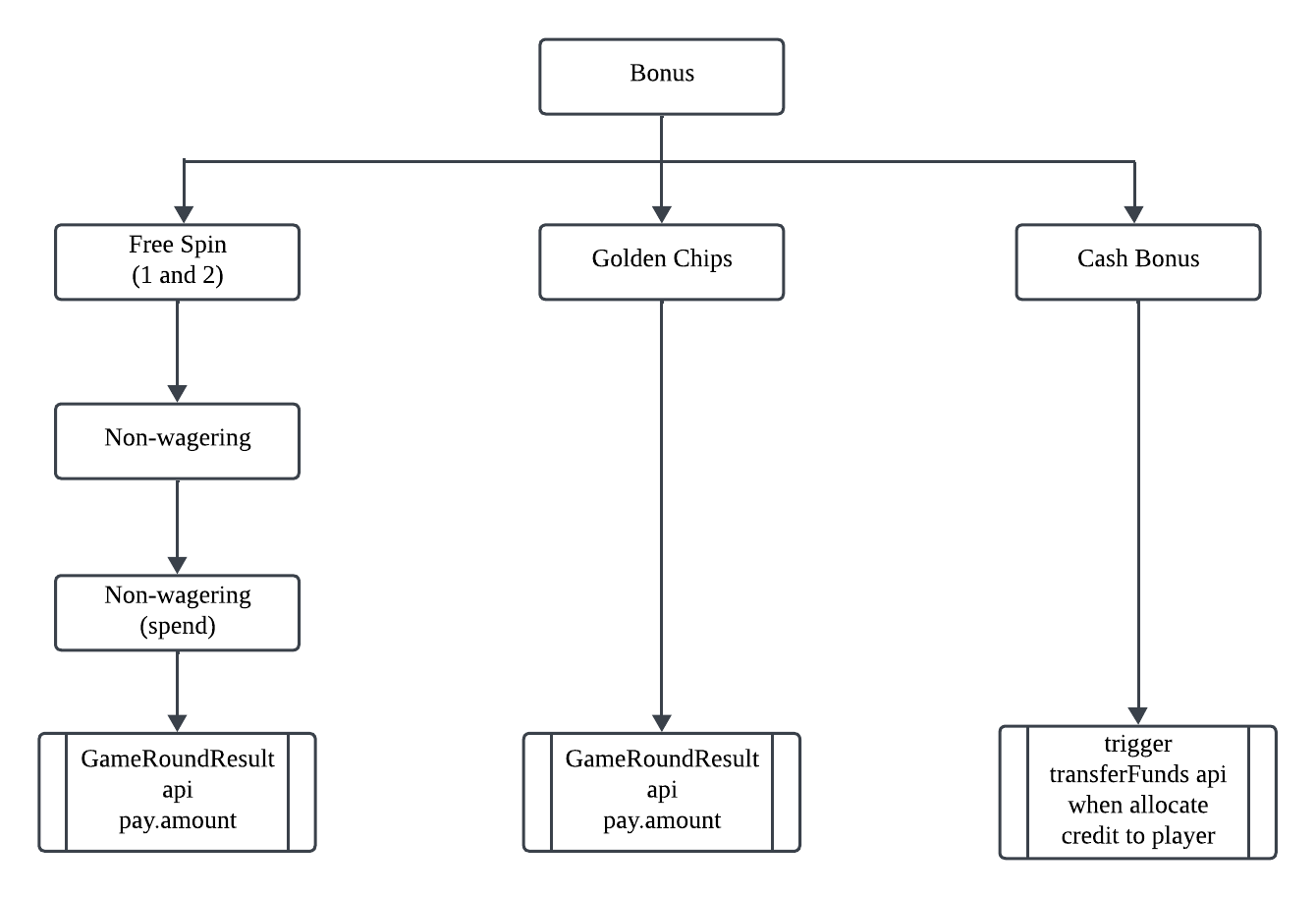
Important:
Will trigger transferFunds API:
Cash Bonus
TransferFunds is an API that Playtech calls to the operator once the required conditions are fulfilled.
Will not trigger transferFunds API:
Free Spins without Wagering (Spend)
Golden Chips
Winnings are credited directly into player wallet via GameRoundResult api parameter "amount" in "pay" object.
TransferFunds only occurs when all free spins are used and the player has winnings."
### Example 1 - Error response in case system failure to process the request - Will be retried until accepted ###
{
	"requestId":"19860313-4rv1-1337-h4xr-123419860313",
	"error":{
		"code":"INTERNAL_ERROR",
		"description":"System down, Please retry"
	}
}

### In case of transfer funds its a must succeed request. There is no error response to decline the transaction. Funds must not get stuck on IMS side ###
TransferFundsRequest:
Parameter
Type
Default
Description
requestId
string
required
Unique identifier of the request to help troubleshooting of problems between the systems. Must be echoed back in the request response.
minSize: 11
maxSize: 255
username
string
required
The username of the player. Must be unique. Must contain kiosk prefix. {{kiosk_prefix}}_{{string}}
minSize: 1
maxSize: 32
transactionCode
string
required
Identifies the transaction that resulted in funds being transferred.
Error descriptor. Only present when service failed to process request
#Report API
All "From Operator" API calls need to provide x-auth-kiosk-key header. Kindly obtain the kiosk key from technical support. This key allows the platform to identify that the request is coming from which operator.
GET/reports/dailyReport
Get a report of total bets, wins, refunds. Grouped by entity name and transaction date.
GET /reports/dailyReport?from_date=2024-07-01&to_date=2024-09-01&timezone=Asia/Kuala_Lumpur&per_page=100&page=1 HTTP/1.1
x-auth-admin-key: {{admin_key}}
This endpoint retrieves the status of a specific game round and also all the relevant game round details. Only can retrieve game rounds up to 3 months earlier from current date.
GET /reports/gameRoundStatus?game_round=1234#b4353&timezone=Asia/Kuala_Lumpur HTTP/1.1
x-auth-admin-key: {{admin_key}}
This endpoint retrieves all game transaction line items within a specified date range and timezone. 1 game round may have more than 1 game transaction line items.
		GET /reports/playerGameTransactionReport?bet_start_date=2025-02-01%2000%3A00%3A00&bet_end_date=2025-02-01%2012%3A30%3A00&game_server=AGCASTG&timezone=Asia%2FKuala_Lumpur&per_page=1000&page=1'
		x-auth-admin-key: {{admin_key}}
			### Error ###
			Connection: Keep-Alive
			Content-Type: application/json; charset=UTF-8
			Date: Fri, 27 Apr 2025 13:18:15 GMT
			{
				"code": 422,
				"message": "The bet start date field is required when result start date is not present. (and 1 more error)",
				"data": null,
				"timestamp": "2025-05-07T02:38:03+00:00"
			}
PlayerGameTransaction Request:
Parameter
Location
Type
Default
Description
x-auth-admin-key
header
string
required
{{admin_key}}
bet_start_date
body
string
required
The start datetime for the report in the specified timezone in YYYY-MM-DD HH:MM:SS format
game_server
body
string
required
The name of the server
bet_end_date
body
string
required
The end datetime for the report in the specified timezone in YYYY-MM-DD HH:MM:SS format
INVALID_REQUEST_PAYLOAD: This code indicates that service failed to deserialize request payload.
INTERNAL_ERROR: Internal service error.
CONSTRAINT_VIOLATION: This error code indicates that service triggered failure during constraints validation on request fields.
ERR_PLAYER_NOT_FOUND: Player not found (should not be retried).
ERR_AUTHENTICATION_FAILED: Authentication failed. Player session token is not valid / expired (should not be retried).
ERR_REGULATORY_GENERAL: General error code for regulatory related decline (should not be retried).
description
string
Description text of error
Balance
Parameter
Type
Default
Description
real
decimal
required
Player's available real money rounded to 2 decimal places, e.g 123.45.
decimalPrecision: 22
decimalScale: 2
timestamp
string
required
Timestamp of the balance snapshot. Format: "yyyy-mm-dd hh24:mi:ss.SSS", GMT timezone.
BetDetails
Parameter
Type
Default
Description
tableCoverage
integer
Table coverage, representing percentage of positions covered by all bets. Whole number in range 0-100.
minValue: 0
maxValue: 100
betType
string
The bet type.
Enum:
MAIN_BET: Bet is a main bet.
SIDE_BET: Bet is a side bet.
BetError
Parameter
Type
Default
Description
code
string
required
Error code
Enum:
INVALID_REQUEST_PAYLOAD: This code indicates that service failed to deserialize request payload.
INTERNAL_ERROR: Internal service error.
CONSTRAINT_VIOLATION: This error code indicates that service triggered failure during constraints validation on request fields.
ERR_PLAYER_NOT_FOUND: Player not found (should not be retried).
ERR_AUTHENTICATION_FAILED: Authentication failed. Player session token is not valid / expired (should not be retried).
ERR_TRANSACTION_DECLINED: General error code for decline transaction (should not be retried).
ERR_INSUFFICIENT_FUNDS: Insufficient funds (should not be retried).
ERR_REGULATORY_GENERAL: General error code for regulatory related decline (should not be retried).
ERR_REGULATORY_REALITYCHECK: Player has hit the time limit configured for reality check. Accompanied with reality check dialog data (should not be retried).
description
string
Description text of error
BetSelections
Parameter
Type
Default
Description
type
string
required
Type of Bets
betAmount
string
required
Amount of the bet
winAmount
string
required
Win amount of the bet
sideBet
string
required
Indicates whether this bet is a side bet.
BonusChange
Parameter
Type
Default
Description
remoteBonusCode
string
required
Identifies the bonus instance on Operator side.
minSize: 1
maxSize: 128
bonusInstanceCode
string
required
Unique identifier of the bonus instance on Playtech side.
ERR_PLAYER_NOT_FOUND : When fail to find player in the database
description
string
Description text of error
FreeSpinChange
Parameter
Type
Default
Description
count
long
required
Change to the count of free spins.
value
decimal
required
Monetary value of the free spin.
decimalPrecision: 22
decimalScale: 2
FreeSpinWinning
Parameter
Type
Default
Description
bonusInstanceCode
string
required
Unique identifier of the bonus instance on Playtech side.
amount
decimal
required
Amount of money won from the Free Spin bet.
decimalPrecision: 22
decimalScale: 2
remoteBonusCode
string
Identifies the bonus instance on Operator side.
minSize: 1
maxSize: 128
bonusTemplateId
string
The code of the bonus template.
FundChange
Parameter
Type
Default
Description
type
string
required
Balance type.
Enum:
REAL: Real balance.
BONUS: Bonus balance.
amount
decimal
required
The player's balance change amount.
decimalPrecision: 22
decimalScale: 2
GameLaunch Data
Parameter
Type
Default
Description
url
string
required
GameLaunch URL
GameMetadata
Parameter
Type
Default
Description
gameVersion
string
Game version used in this specific session. Required in Greece and Switzerland regulation.
minSize: 0
maxSize: 32
payTableId
string
Game pay table identifier. Required in Greece regulation.
minSize: 0
maxSize: 40
GameRoundClose
Parameter
Type
Default
Description
date
string
required
Game round close time in game server.
minSize: 1
maxSize: 23
rngGeneratorId
string
Identifier of the RNG hardware/software that was used for random numbers in the finished game. Required in Danish regulation.
minSize: 0
maxSize: 32
rngSoftwareId
string
Random number scaling and mapping software identifier - the software that is used for converting numbers from RNG into usable values in game logic. Required in Danish regulation.
Additional game round details. Required in Slovak regulation.
GameRoundDataLineItem
Parameter
Type
Default
Description
id
string
required
The identifier of the line item.
bet_date
string
required
The datetime of the bet.
transaction_date
string
required
The datetime of the transaction.
transaction_code
string
required
The code of the transaction.
type
string
required
The type of the transaction (BET/WIN/NOWIN/REFUND).
game_round_close
boolean
required
Indicates if the game round is closed.
operator_acknowledged
boolean
required
Indicates if the operator has received & acknowledged the transaction.
currency
string
required
The currency used.
amount
integer
required
The amount of the transaction.
progressive_bet
integer
required
The progressive bet amount.
progressive_win
integer
required
The progressive win amount.
created_at
string
required
The creation date of the transaction.
GameRoundResultError
Parameter
Type
Default
Description
code
string
required
Error code
Enum:
INVALID_REQUEST_PAYLOAD: This code indicates that service failed to deserialize request payload.
INTERNAL_ERROR: Internal service error.
CONSTRAINT_VIOLATION: This error code indicates that service triggered failure during constraints validation on request fields.
ERR_PLAYER_NOT_FOUND: Player not found.
ERR_NO_BET: This error code indicates that the request was rejected because the referenced bet transaction was not found. Used only for requests where the Pay.type value is REFUND.
The error descriptor. Only present when the service failed to process the request.
GetSupportedFreeSpinBetValuesError
Parameter
Type
Default
Description
code
string
required
Error code
Enum:
INVALID_REQUEST_PAYLOAD : This code indicates that service failed to deserialize request payload.
INTERNAL_ERROR : Internal service error.
CONSTRAINT_VIOLATION : This error code indicates that service triggered failure during constraints validation on request fields.
ERR_INVALID_GAMECODENAME : Unknown game code name provided.
description
string
Description text of error
GiveFreeSpinsError
Parameter
Type
Default
Description
code
string
required
Error code
Enum:
INVALID_REQUEST_PAYLOAD : This code indicates that service failed to deserialize request payload.
INTERNAL_ERROR : Internal service error.
CONSTRAINT_VIOLATION : This error code indicates that service triggered failure during constraints validation on request fields.
ERR_PLAYER_NOT_FOUND : Player not found (should not be retried).
ERR_BONUS_TEMPLATE_NOT_FOUND : Bonus template not found (should not be retried).
ERR_INVALID_FREESPIN_BET_VALUE : One or more Free Spin bet values provided is not supported by the specified games or the Free Spin bonus amount is not divisible by the bet value(s).
description
string
Description text of error
GiveFreeSpinsData
Parameter
Type
Default
Description
RequestID
string
required
Unique identifier of the request to help troubleshooting of problems between the systems
bonusInstanceCode
long
required
Unique identifier of the bonus instance on Playtech side that player was given.
Information about money won from bonus bets. Pay transaction amount already contains all these funds.This breakdown is provided only for informational purposes. Provided only if bonus money was used for betting and player won from this money.
PlayerData
Parameter
Type
Default
Description
currencyCode
string
required
The player's currency code (ISO 4217).
countryCode
string
required
The player's country code (ISO 3166-1 alpha-2).
accountVerificationStatus
string
The player's account verification result. Mandatory in French regulation. Possible values: UNKNOWN, FAILED, PASSED, INPROCESS, REVIEW.
externalId
string
A 40-character hexadecimal SHA1 hash of the player's personal data in the format <Name, Surname, Date of Birth, Place of Birth>. Mandatory in French regulation.
PlayerDialog
Parameter
Type
Default
Description
dialogId
string
required
ID of the dialog. Used for referencing player's decision.
type
string
required
Type of the dialog
Enum:
REALITYCHECK: Reality check.
playerMessage
string
required
Message to be displayed to player.
PlayerGameTransactionData
Parameter
Type
Default
Description
player_username
string
required
The username of the player.
bet_date
string
required
The date when the bet was placed.
result_date
string
required
The date when the game result was recorded.
game_code
string
required
Unique code of the game.
game_alias_code
string
required
Game alias Code
game_round
string
required
Unique identifier of the game round.
status
string
required
The status of the game round.
is_closed
boolean
required
Indicates whether the game round is closed.
is_refund
boolean
required
Indicates whether the game round was refunded.
currency
string
required
The currency used for the bet.
bet
number
required
Amount bet by the player.
win
number
required
Amount won by the player.
refund
number
required
Refund amount (if applicable).
progressive_bet
number
required
The amount of the bet allocated to a progressive jackpot.
progressive_win
number
required
Amount won from the progressive jackpot.
free_spin_bet
number
required
Amount bet using free spins.
free_spin_win
number
required
Amount won from free spins.
golden_chip_bet
number
required
Amount bet using golden chips.
golden_chip_win
number
required
Amount won from golden chips.
game_history_url
array
required
Array of URLs to the full game history view.
operator_result_acknowledged
boolean
required
Indicates if the operator acknowledged the result.
Details on how bonus instance was removed. Not present in case bonus is still active.
givenGoldenChipCount
long
Initial count of golden chips that were given to player.
remainingGoldenChipCount
long
Remaining count of golden chips that player has not yet used. Not provided in case bonus instance is removed.
goldenChipValue
decimal
The monetary value of single golden chip.
decimalPrecision: 22
decimalScale: 2
freeSpinBetValue
decimal
The value of a single Free Spin bet. Available only after the player has accepted the Free Spin bonus.
decimalPrecision: 22
decimalScale: 2
Set PlayerTags Error
Parameter
Type
Default
Description
code
string
required
Error code
Enum:
ERR_SYSTEM : General system error. Transaction state is not known. Idempotent transactions must be retried. Report to tech.
ERR_HEAVY_LOAD : Server is under heavy load. Internal error.
ERR_AUTH : Authentication error. Authentication parameters were invalid. Also external wallet might be the source.
ERR_INVALID : Request is somehow invalid (mandatory parameter missing or parameters such as currency, session type are different in retry).
ERR_DENIED: Insufficient API permissions for the action. Contact your project manager or tech support for assistance.
ERR_OBJECT_NOT_FOUND/ERR_NOT_MODIFIED : Object is not found in system. Check the value of ObjectIdentity.
ERR_2FA_TOKEN_REQUIRED :Two factor session validation needed to continue operation..
description
string
Description text of error
SubJackpotContribution
Parameter
Type
Default
Description
amount
decimal
required
Amount of money contributed to sub-jackpot prize pool.
decimalPrecision: 36
decimalScale: 16
jackpotId
string
required
Sub-jackpot network ID.
jackpotCycleId
string
The identifier of the current jackpot cycle that is unique per jackpot. It is generated when a new jackpot cycle starts after a jackpot pool payout.
jackpotCycleCounter
long
The number of times a jackpot has been paid out from this jackpot pool.
TransferFundsError
Parameter
Type
Default
Description
code
required
required
Error code
Enum:
INVALID_REQUEST_PAYLOAD : This code indicates that service failed to deserialize request payload.
INTERNAL_ERROR : Internal service error.
CONSTRAINT_VIOLATION : This error code indicates that service triggered failure during constraints validation on request fields.
ERR_PLAYER_NOT_FOUND : Player not found (should not be retried).
description
string
Description text of error
UnfinishedGameRoundsData
Parameter
Type
Default
Description
id
string
required
The id of the unfinished game round.
entity_name
string
required
The name of the entity involved in the unfinished game round.
bet_date
string
required
The unfinished game round bet date.
player_username
string
required
The username of the player involved in the unfinished game round.
game_code
string
required
The game code of the unfinished game round.
game_round
string
required
Game round code
operator_token
string
required
The game session token of the operator involved in the unfinished game round.
currency
string
required
The currency involved in the unfinished game round.
bet
decimal
required
The bet amount in the unfinished game round.
win
decimal
required
The win amount in the unfinished game round.
refund
decimal
required
The refund amount in the unfinished game round.
progressive_share
decimal
required
The progressive share amount in the unfinished game round.
progressive_win
decimal
required
The progressive win amount in the unfinished game round.
Gameplay Scenarios
#Broken Game
A broken game occurs when the player is unable to complete an action within the game, e.g. making an in-game bonus round bet. There might be several reasons for this, mainly player side connectivity problems or technical errors between Playtech and the Operator Wallet communication.
The player can finish a broken game when they re-launch the same game where the broken game occurred.
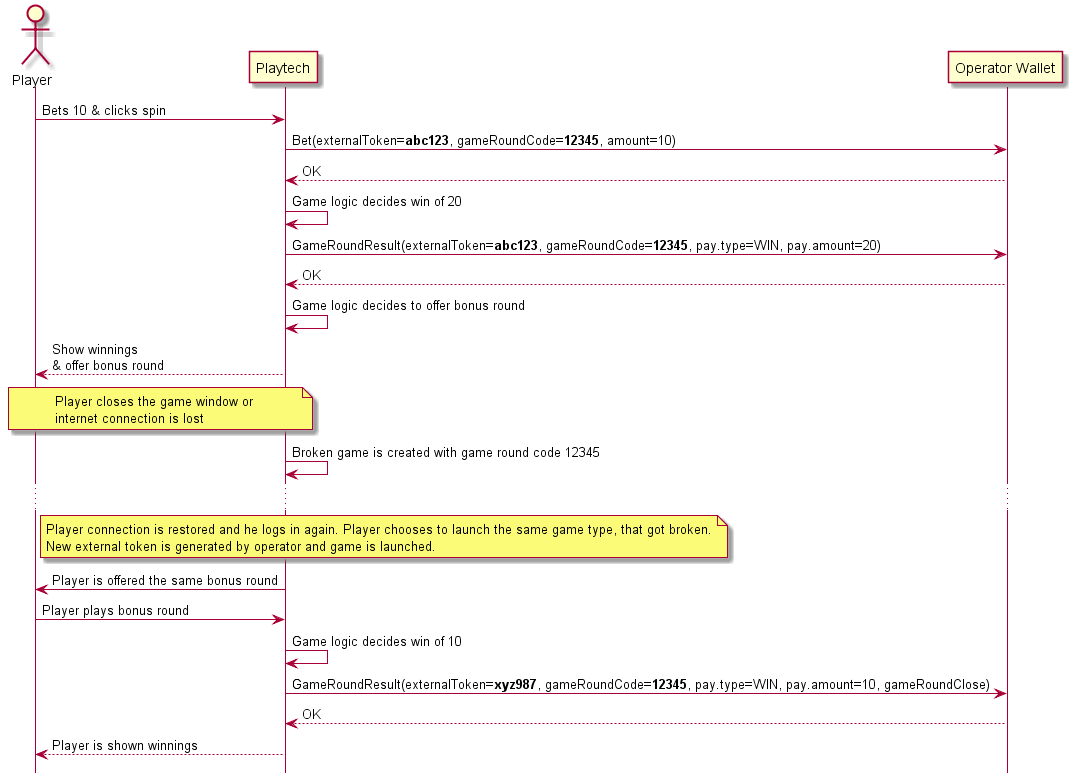
The following example scenario demonstrates a broken game creation after the main game round which ended with a bonus round offering without a player’s response. Since the broken game is launched as a new game, the external token is different from the one used initially.
#In-game Bonus Round
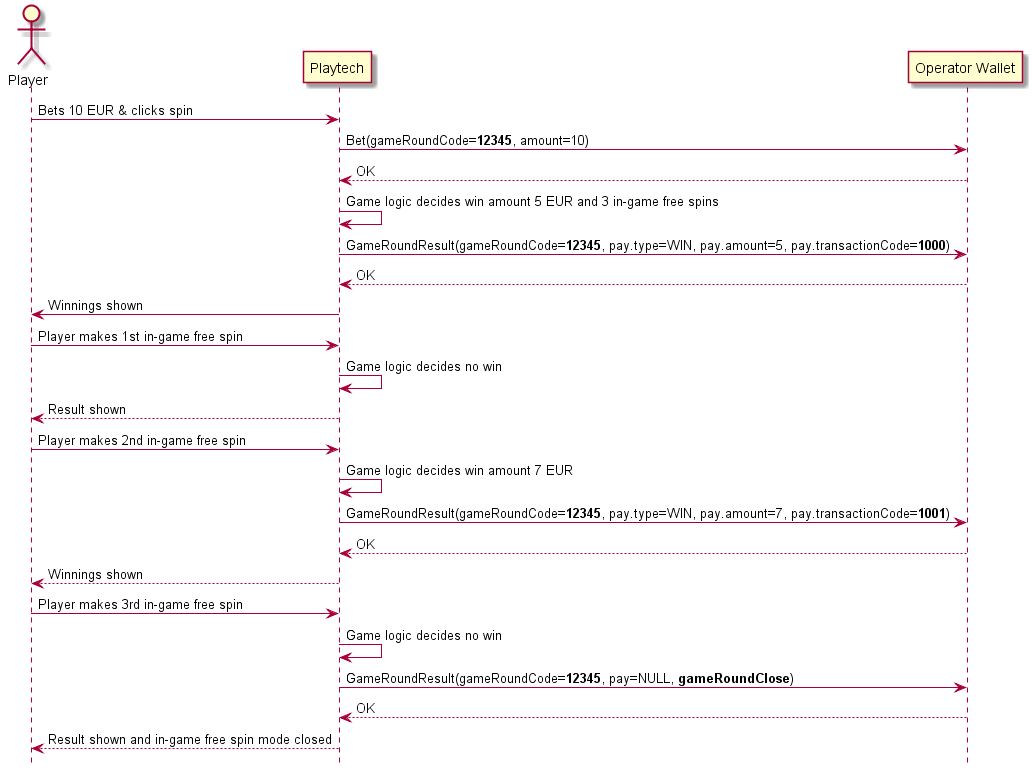
Game logic may decide to offer the player a bonus round based on previous gameplay. In this case, the game round is not closed after the main round and additional winnings may follow. If player wins, a GameRoundResult request is sent with Pay object. If the player does not win, nothing is sent to the Operator side, unless it’s the final spin/bet of the bonus round. In this case, a GameRoundResult is sent without Pay object, but with GameRoundClose object to indicate that this game round can be closed now on the Operator side and no more transactions are expected for this round.
Please note that all GameRoundResult requests sent within the main and bonus round combination carry the same gameRoundCode.
#Regular Game Round
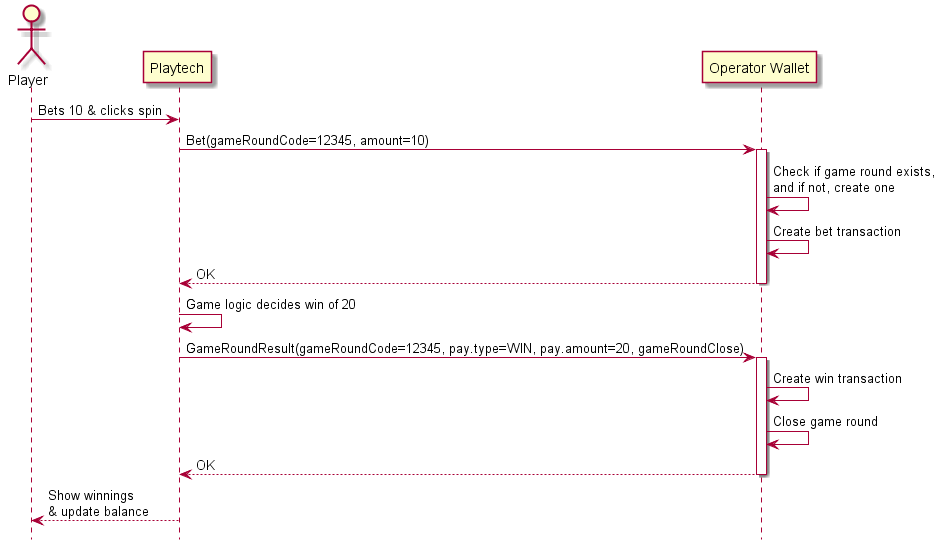
During a regular game round, the player makes a bet and clicks spin in the game client. Playtech sends Bet request to the Operator’s wallet. The Operator must decide based on the included game round code, whether to open a new game session or if the bet is part of an existing game round. At the end of the game round, a GameRoundResult request is sent. It contains information about the win transaction (if any) and indicates whether the game round has ended or there is more activity expected.
#Refund
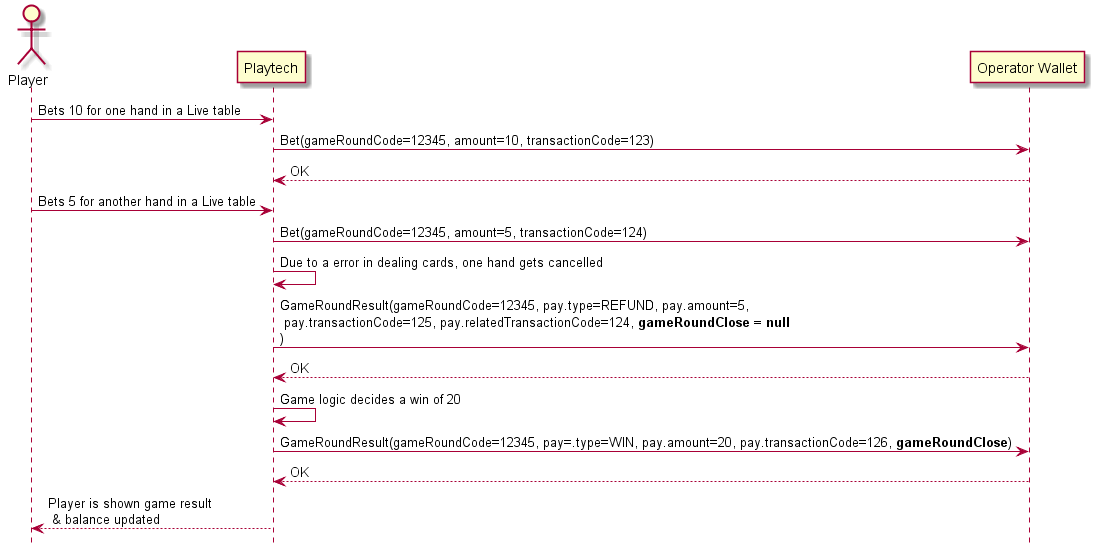
In Live table games, players are able to play with multiple hands. Due to various errors, one or all hands might get refunded. For this, a dedicated Pay type is used in the GameRoundResult request. The Pay object will contain the refunded amount but also refers to the original Bet transaction that is being refunded.
If the player also wins as part of the game round, then 2 GameRoundResult requests are sent: one for the refund and one for the win.
#Response Times / Timeout (Retry)
Due to Live and Poker real time gameplay, Playtech excpects response for every request in less then 250ms. Anything above that number might cause technical difficulties and refund to be sent to the wallet (gameRoundResult.pay.type = ‘REFUND’) so that gameplay can continue normally.
#Spend-only Free Spins
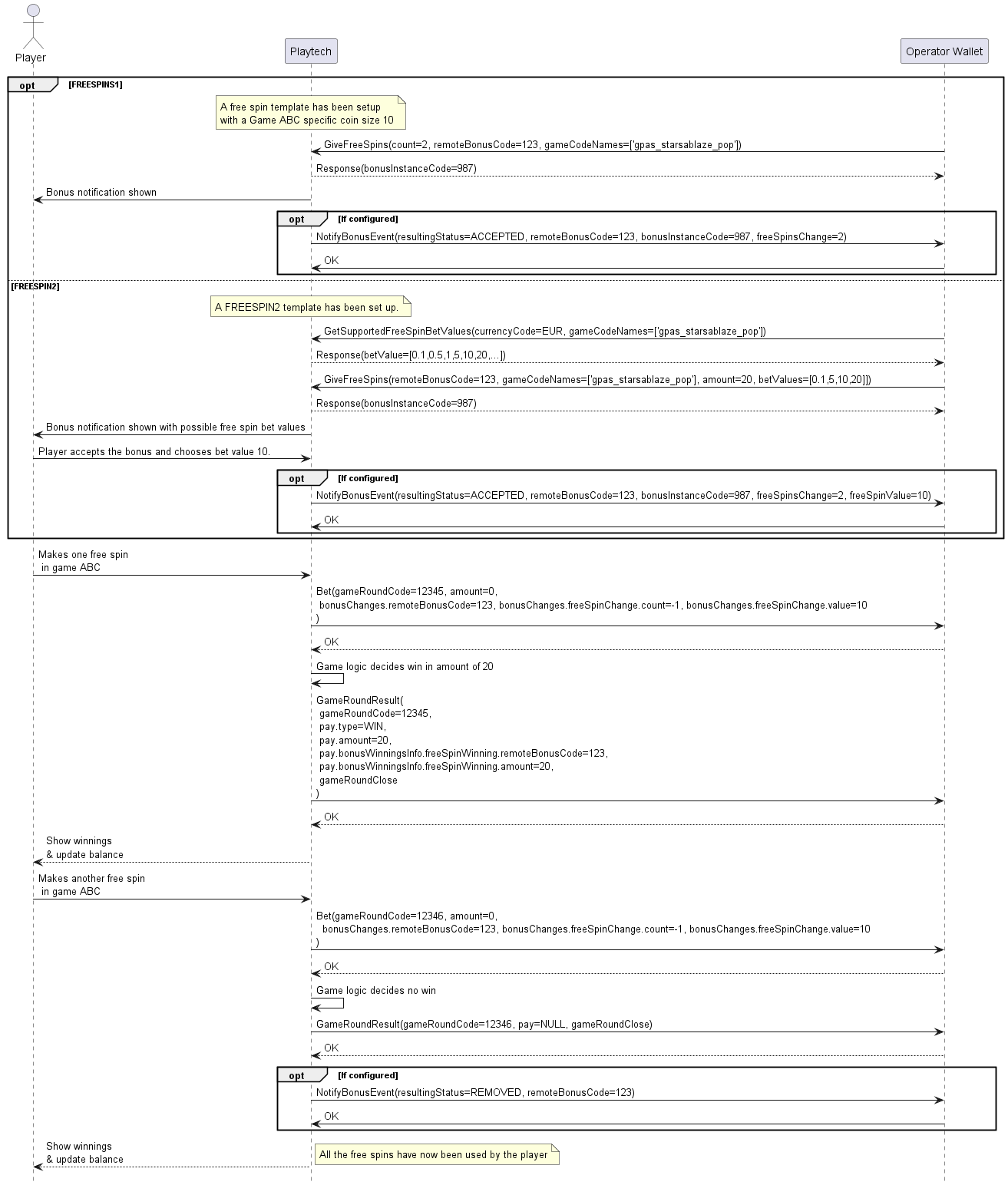
Free spin can be issued with GamesLink Service API GiveFreeSpins request. In case of FREESPIN1 bonus template, the free spins count must be provided. In case of FREESPIN2 bonus template, free spins total amount and possible value(s) of a single spin must be provided. To know the supported free spin bet values of a game/games, a request GetSupportedFreeSpinBetValues must be made before issuing a bonus.
Spend-only free spins have no wagering requirements and winnings are immediately released to the player’s balance after every round. If a player makes a Bet from such a bonus, then the amount value is zero (no funds are requested from Operator’s wallet).
In case FREESPIN2 bonus is used, then the free spin bet value becomes known at the point of player accepting the bonus and choosing a bet value. If only single possible bet value configured, then it’s known already at the point of issuing.
The free spin game round result is passed with a regular GameRoundResult request, with the included (real money) winnings, if any.
Optionally, if configured, NotifyBonusEvent requests are sent once the player receives the bonus and the bonus is removed from the player after using up all the free spins.
#Spend-only Golden Chips
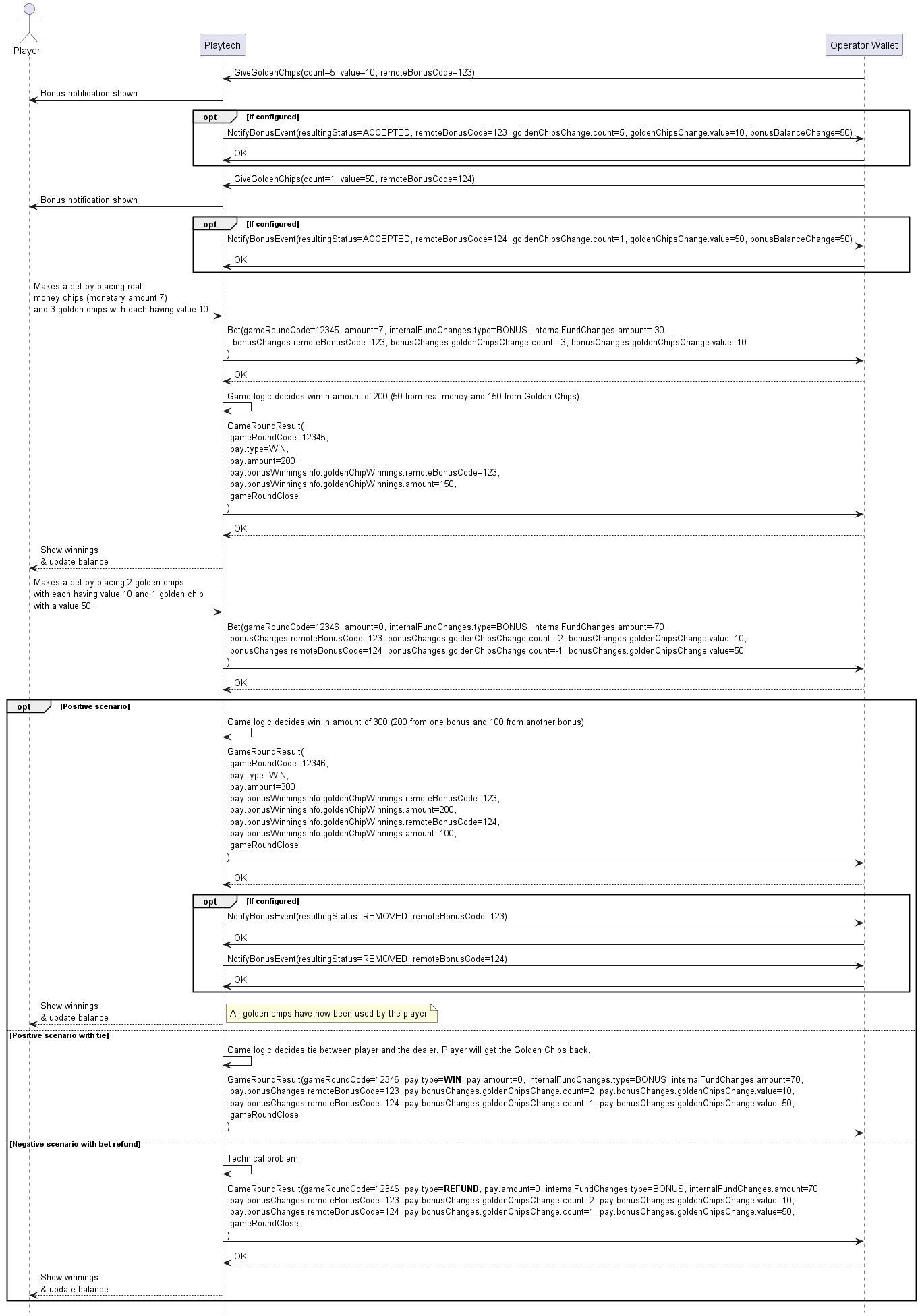
Spend-only golden chips have no wagering requirements and winnings are immediately released to the player’s balance after every round. The player can combine golden chip bets with real money. In such cases, Bet request with a positive amount field is sent. Bonus money usage is reflected in the internalFundChanges object, which indicates how much money was taken from Playtech’s bonus balance.
The player can use multiple golden chip bonus instances in a single bet. The breakdown of all the used bonuses is brought out in bonusChanges field. This object contains information about the count of golden chips used and also the monetary value of a single chip.
The game round result is passed with a regular GameRoundResult request, with the included (real money) winnings, if any.
If there is a tie between player and dealer or bet is refunded for whatever reason, the golden chips are returned to the player’s bonus balance. In such case, the GameRoundResult pay object contains the bonusChanges object, which reflects the golden chips returned to the player. In case of tie, the pay type is “WIN”. In case of refund, the pay type is “REFUND”.
Optionally, if configured, NotifyBonusEvent requests are sent once the player receives the bonus and the bonus is removed from the player after using up all the golden chips.
#Technical Error Handling (Retry)
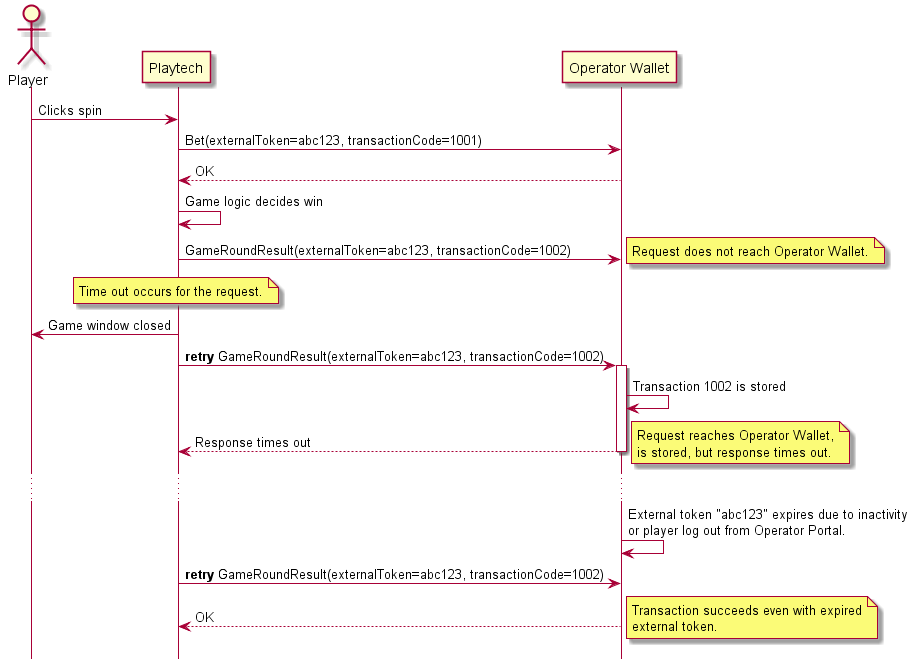
If a technical error or time-out occurs during any of the transactional requests (Bet, GameRoundResult), Playtech will retry the request until a successful response or a final error is returned. In the case of GameRoundResult, the Operator must accept the request even with an expiredexternalToken, because the retry process may take longer than the lifetime of the external token session. Bet request must only be accepted with an expired external token if the transactions already exist on the Operator side.
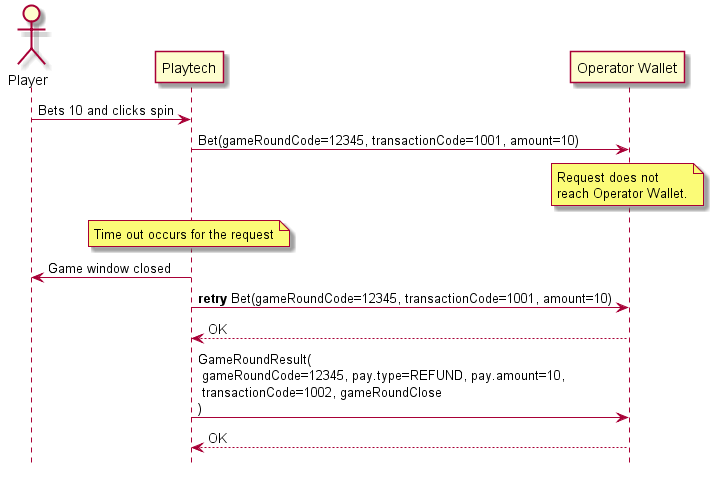
In case of a game operation failure due to time-out or a system error or any other indefinite response, the game client is always closed automatically. A broken game is created only once a retry succeeds and only if the player has pending actions within the game, e.g. free spins or any other in-game bonus rounds.
The following example demonstrates a flow where the first GameRoundResult request doesn’t reach the Operator’s Wallet at all. The second retry reaches the Operator’s Wallet, but the response is not received by Playtech. Meanwhile, the external token session also expires, but the third retry is still successful because the Operator can determine the request as being a retry.
The following example describes a scenario where the initial Bet request fails, but the retry succeeds. Since the game client has been closed by that time, Playtech will initiate a 100% bet refund operation through the GameRoundResult request, meaning that the game round is voided and should not be reported in the game history.
#Bonus Scenario
Golden Chips
									### Example 1 - Golden Chip Bet  ###
									{
										"requestId": "ff645dc6-da85-4fe1-b90d-e614da1fedb1",
										"username": "CRXTESTDEV_HELLO",
										"externalToken": "CRXTESTDEV_TOKEN8888663732",
										"gameRoundCode": "59727245",
										"transactionCode": "82760658",
										"transactionDate": "2025-04-17 10:10:50.000",

										"amount": "100",                  // Amount of player's own money used for the bet

										"internalFundChanges": [
										  {
											"type": "BONUS",
											"amount": "-2"                // Amount deducted from Golden Chip
										  }
										],

										"gameCodeName": "ba",

										"betDetails": {
										  "tableCoverage": 55,            // Indicates the table number or coverage percentage
										  "betType": "MAIN_BET"
										},

										"bonusChanges": [
										  {
											"remoteBonusCode": "0000010",
											"bonusInstanceCode": "5259758",
											"goldenChipsChange": {
											  "count": -1,                // Number of Golden Chips deduct
											  "value": "2"                // Value per Golden Chip used
											},
											"bonusTemplateId": "66983",
											"remoteFreeSpin": false       // Indicates this is not a free spin usage
										  }
										]
									  }


										### Example 2 - Golden Chip GameRoundResult ###
										{
											"requestId": "073db0eb-bea4-4765-b9fe-83929028f76c",
											"username": "CRXTESTDEV_HELLO",
											"externalToken": "CRXTESTDEV_TOKEN8888663732",
											"gameRoundCode": "59727245",
											"gameCodeName": "ba",
											"pay": {
											  "transactionCode": "82760660",
											  "transactionDate": "2025-04-17 10:10:51.000",
											  "amount": "202",                  // Total amount won by the player in this round
											  "type": "WIN",
											  "betType": "MAIN_BET",
											  "internalFundChanges": [],
											  "bonusChanges": [],
											  "bonusWinningsInfo": {
												"goldenChipWinnings": [
												  {
													"remoteBonusCode": "0000010",
													"bonusInstanceCode": "5259758",
													"amount": "2",              // Winnings attributed by the Golden Chip
													"count": 1,                 // Number of Golden Chips used
													"bonusTemplateId": "66983"
												  }
												]
											  }
											},
											"jackpot": {
											  "contributionAmount": "0",
											  "winAmount": "0"
											},
											"gameRoundClose": {
											  "date": "2025-04-17 10:10:51.000",
											  "rngGeneratorId": "SecureRandom",
											  "rngSoftwareId": "Casino CaGS 25.1.3.0"
											},
											"gameHistoryUrl": "https://extstg3-cashier01.ptstaging.eu/getgamehistoryurl.php?casino=ptstaging3.210&username=CRXTESTDEV_HELLO&ngscode=24122441&remotesessionenddate=2025-04-17+10%3A10%3A51&token=405359e6f078430c395aae2caaa2aa45b9e870ce7b8abb0ba5e2ef49fe138007&language=EN&showFullHistoryPerBet=false"
										  }
											### Example 1 - Golden chip  bet  ###
											{
												"requestId": "ff645dc6-da85-4fe1-b90d-e614da1fedb1",
												"externalTransactionCode": "82760658",
												"externalTransactionDate": "2025-04-17 10:10:50.000",
												"balance": {
												  "real": "300.00",
												  "timestamp": "2025-04-17 10:10:50.918"
												}
											  }


											  ### Example 2 - Golden chip gameroundresult  ###
											  {
												"requestId": "073db0eb-bea4-4765-b9fe-83929028f76c",
												"externalTransactionCode": "82760660",
												"externalTransactionDate": "2025-04-17 10:10:51.482",
												"balance": {
												  "real": "502.00",
												  "timestamp": "2025-04-17 10:10:51.482"
												}
											  }
Step 1
The player is given 3 Golden Chips.
```java
GiveGoldenChips(count=3, remoteBonusCode=0000010)
```
Operator Balance
PT Golden Chips Count
400
3 (+3)
Step 2
The player makes a golden chips bet in a game(golden chip+regular bet).
Game logic generates win in the amount of 100 .The win is divided proportionally for bonus and real, based on the bet proportions: 50 to bonus balance as 50% was taken from
pending bonus winnings; 27.2 to Operator Wallet as 27.2 of the other half was taken from there
and remaining 22.8 to PT real winnings. The wagering requirement is reduced by the bet amount.
Bonus has been redeemed: no free spins left and wagering requirements completed. Money is released to Operator Wallet: 50 from bonus balance + 14.8 from real balance.
```java
Transferfunds(amount=50, remoteBonusCode=000000)
Transferfunds(amount=14.8)
```
Operator Balance
PT Free Spins Count
PT Pending Bonus Winnings
PT Real Balance
PT Wagering Requirement
164.8(+64.8)
0
0(-50)
0(-14.8)
0
#FAQ
Can an operator assign multiple bonus templates to a player?
Yes, different bonus templates can be assigned to a player without issue.
What happens if the same bonus template ID is assigned to the player more than once?
Playtech will still accept the reassignment of a duplicate bonus template ID to the same player.
However, the player will only be able to accept the first instance of the bonus offer; any subsequent offers with the same template ID will not be accepted again.
Can an operator remove a player's bonus?
Yes, the operator can remove a bonus using the removeBonus API, regardless of whether the player has accepted or partially redeemed it.
The same bonus can also be reissued to the player, as long as it is within the configured claim limit.
However, once the player has fully redeemed the bonus, it can no longer be removed.
How do you differentiate FREESPIN1 and FREESPIN2?
FREESPIN1: Requires the operator to provide count when calling giveFreeSpin.
FREESPIN2: Requires the operator to provide amount and betValues when calling giveFreeSpin.
How many types of freespins are there?
Freespin without wagering (spend): Winnings from the free spins will be credited directly to the player's wallet.
Remove Bonus can be done regardless of whether the player has accepted or partially redeemed their bonus.
May trigger the notifyBonusEvent callback depending on the configuration settings. Operators should ensure that the relevant bonus event handling logic is in place if this callback is enabled.
How can an operator determine the remaining bets required before triggering the transferFunds API?
Operators can use the getPlayerActiveBonus API, which offers real-time information about the player's active bonus status — including the outstanding wagering amount and remaining free spin needed to meet the bonus requirements.
How cash bonus works?
Accept immediately: When a TAM or a member of the Marketing manually awards a cash bonus to a player,the system will automatically trigger the transferFunds API to credit the bonus amount to the player's wallet. This process occurs regardless of the player's online status — whether the player is online or offline at the time of the award, the bonus will be delivered seamlessly.
When an IMS user awards a cash bonus to a player, the system automatically triggers a transferFunds API request to the operator.
This process occurs regardless of whether the player is online or offline at the time the bonus is granted, ensuring that the bonus is delivered seamlessly.
Will the transferFunds API be triggered if an operator removes a player's bonus?
No, the transferFunds API will not be triggered when an operator manually removes a bonus from a player. Bonus removal is considered an administrative action and does not result in any fund transfer to the player's wallet.
Should player usernames be treated as case-sensitive during authentication?
No, player usernames should be compared in a case-insensitive manner during authentication. Operators must ensure that the case of the input does not affect the outcome of the authentication process.
For example, "TESTPLAYER" is same as "testplayer" during the authenticate process.